Crafting Immersive Narratives
The SJ Experience
A brand gallery experience where immersive UIUX innovation blends with storytelling, revealing SJ's vision for sustainable urban futures.
My Role
Experience Designer, UIUX Designer
My Contributions
Experience Conceptualisation, Brand Toolkit, Design System, User Research, User Flow, Prototyping, User Interface Design, Visual Design
The Team
Leading in the UI/UX aspect, I collaborated with a design manager and content curator to seamlessly integrate multimedia with the physical experience, ensuring an immersive journey for visitors.
Status
Launched in March 2024
Client
SJ
Deliverables
Multimedia Experience Strategy
UIUX Prototype
Tools
Figma
Adobe Creative Tools

01 Background
Goals
Inspire / Immerse / Intrigue
To create an immersive and interactive brand gallery at SJ's global HQ to connect visitors with its identity, values, capabilities, and vision.
Target Audience
VIP Diginatries Experts & Partners
“I want to learn about and invest in sustainable innovations to steer my nation toward a more progressive and advanced state.”
Large and Small Group Clients
“I am looking to partner with a business to create smart solutions which will help my business while leaving a positive impact on the world.”
Campus Community Next Generations
“I want to learn more about new upcoming solutions to help me understand how I can help to shape a better future.”
02 Experience Strategy

Campus IQ
A multimedia data art installation embodying the company's sustainability vision.

Shared Horizons
Graphic wall delving into company’s history, leading up to an immersive corporate video introducing the company’s vision and mission

Our People
Interactive video totems to hear from end-users on first-hand real-world issues, and how company’s efforts solve the world’s greatest challenges

Solutions at Scale
Immersive dual-screen exhibit showcasing the breadth of company’s offering through interactive exhibits highlighting relevant projects

Future Legacy
Interactive touchscreens unveiling company’s strategic visions for large-scale city planning, its CSR and sustainability efforts, and innovation processes

Real Impact, Made Together
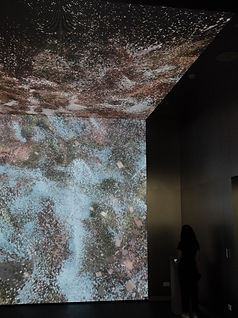
A LED ceiling-to-wall art interactive transforming visitors' aspirations into a unique city grid that becomes part of the collaborative mural

Curiosity, immersed
Excited
Moved, anticipatory
Intrigued, pondering
Hopeful, imaginative
Inspired
03 Brand Toolkit
A Design System Reflecting Innovation and Sustainability
The brand toolkit reflects SJ's commitment to innovation and sustainability through its design system and branding.
Look and Feel — Smart, Intuitive, Simple, Responsive, Bold, Interactive, Dynamic, Organized
The digital interfaces are smart and intuitive, providing a simple and responsive user experience. A bold and interactive approach ensures a dynamic and layered interface, unified by the 'Digital Blue'.
The design incorporates grids and geometric patterns to structure content, offering a grid-like dashboard with a dynamic and organized look.

Moodboard for UI Look and Feel
Color Palette
Our color palette features digital blue in varying shades for content hierarchy, complemented by warm grey, impact red, and space grey. Impact red is reserved for highlighting key information.

Typography Hierachy
The toolkit uses the Sohne font, with font sizes and weights varied dynamically according to content hierarchy, ensuring readability and visual appeal.

UIUX Components
The iconography employs single line weight pictograms, ensuring a cohesive and clean look. UI components utilize a strong use of color, with consistent single line weight for all graphics, lines, and graphs, creating a visually striking and intuitive interface.

04 Key Interactive 1 — Real Impact, Made Together
Real Impact, Made Together
The interactive serves as a captivating conclusion to the brand gallery experience, empowering participants to articulate their visions for the cities of tomorrow.
Centered around the question "I want to create a future that is...", users select words from an infinite scroll word cloud to shape unique genrative cityscapes on the LED wall display. These individual aspirations converge to form collaborative landscapes, showcasing a mesmerizing tapestry of collective imagination.



User Flow

Home Page
Interactive Question 1
Interactive Question 2
Personal Details
Loading Page
Artwork Reveal + Send to Email
+ 'Add to Canvas' (LED Wall)
Thank You Page
Design Process
The interactive emerges from a conceptual framework grounded in the belief that the future of our urban environments is not predetermined, but rather, shaped by the collective dreams and aspirations of society.
In conceptualizing this project, the aim was to create a platform where individuals could actively engage in envisioning and co-creating the cities they wish to inhabit. This vision guided every aspect of the project, from the design of the interactive interface to the dynamic generation of cityscapes on the LED wall display.


Art Direction Inspiration: Bird’s eye view of cities at night from a plane’s window, an ever-evolving and growing city
User Engagement and Empowerment - Translating User Visions into City Artwork
At the heart of the interactive experience lies a pivotal question: "I want to create a future that is...". Participants are prompted to explore this question, selecting words from an infinite scroll word cloud that resonate with their aspirations for urban environments.

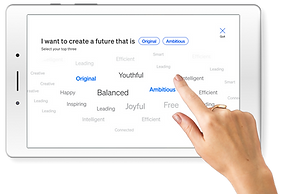
Infinite Scroll Word Cloud Encompassing a Wide Spectrum of Themes
These selections serve as the catalyst for shaping unique generative artwork, where each word chosen dynamically maps to city parameters. Through this process, individual visions seamlessly merge, culminating in captivating cityscapes that reflect the collective imagination of participants.


Varying City Parameters
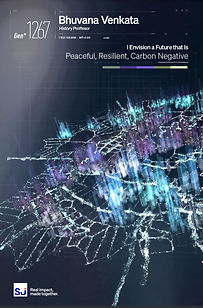


Sample Generations Emailed to Participants
05 Key Interactive 2 — Solutions at Scale
Solutions at Scale
At the heart of the brand narrative is a dual-screen central showcase that highlights a range of architectural and built environment projects by SJ. Users interact with the display using RFID technology. By placing an RFID cube on the reader, users launch an immersive experience, enabling hands-on exploration and deeper insights into each project.

Interactive Set-up: Dual Screens with RFID Cube Integration

Using RFID Cube to Launch Project-specific Exploration
Challenge
How might we create an interface that allows users to select and explore a curated set of architectural projects, offering adaptable navigation and delivering concise, engaging content?
Aligning User Requirements and Business Goals
Understanding both user needs and business objectives is crucial in designing an effective interface. It is essential to grasp what the business wants to showcase and their concerns, while also ensuring the interface remains intuitive and engaging for users.
User Research Methodologies
To achieve this alignment, a series of user research methods are employed.
1. Competitive Audit
Identifying industry standards and best practices to align interface features with user expectations and identify differentiation opportunities.
2. User Interviews
Gaining insights into user preferences, needs, and pain points to tailor the interface to better meet user needs while addressing business concerns.
3. Card Sorting
Organizing content based on user input to ensure intuitive information architecture and user-friendly navigation.
4. Affinity Diagram
Synthesizing qualitative data to identify common user pain points, preferences, and improvement opportunities for prioritized design decisions.
Research Insights
The research has identified critical insights that highlight user preferences and needs, guiding the development of an interface that balances business objectives with user engagement. These insights have shaped the themes and ideas for a consistent, brand-aligned, and engaging user experience.
01
Seamless Design Experience
Users favor a consistent and intuitive design framework, emphasizing standardized interaction patterns and familiar navigation structures for a seamless experience. Flexibility in the interface allows for personalized interactions.
02
Brand Trust and Engagement
A clean design and brand-aligned color palette enhance readability and build trust. Multimedia content keeps users engaged, while accessibility considerations ensure inclusivity.
03
Engaging Content Delivery
Clear and concise communication is preferred, with structured information presentation. Interactive elements and video walkthroughs cater to diverse preferences, offering both depth and brevity.
Starting the Design
User feedback was synthesised into key themes, revealing recurring needs, pain points, and opportunities to guide the design.

Affinity Diagram to Streamline Brainstorming
The Set-up
The setup features a dual-screen configuration: a 2x4 main display and a 1x3 table display for control and navigation. Next to the table display, 10 RFID cubes represent unique projects.
From the idle screen showing an introduction to all projects, users select an RFID cube and place it on the reader to launch a project-specific exploration. This tactile-digital interaction enhances user immersion and engagement.

Dual-screen Configuration Set-up
UIUX Mockup of the Set-up

2x4 Main Display

1x3 Table Display with RFID Cubes and Reader Set-up
Content Organization and Navigation
Clear and Structured Information Flow
The information architecture is organized for clear hierarchy and easy navigation. It flows from an overview of 10 projects (idle screen) to project-specific exploration. Each project follows a consistent framework: overview, design process, context, approach, and impact. This structure ensures users can easily navigate and engage with the content.
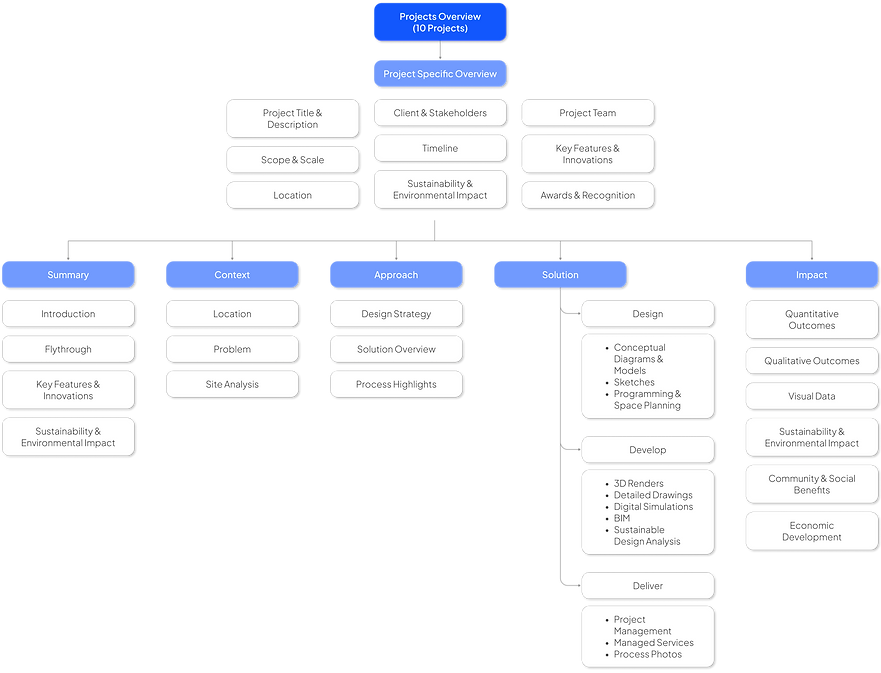
Information Architecture
Architectural Design Process as Navigation Framework
The user flow mirrors the architectural design process, ensuring clarity and engagement. From the idle screen, users select a project and delve into project-specific exploration. The journey progresses through phases, covering project overview, design process, context, approach, and impact assessment. A persistent menu allows seamless transitions between detailed exploration and summary videos, offering a cohesive and immersive experience.

User Flow
Testing the Concept
The design iteration process began by extracting the essence of the brand toolkit, adopting a dashboard approach with a dynamic grid system to organize information and content. This setup ensures a visually engaging presentation.
Wireframes were developed with several templates to structure content hierarchy. These templates feature varying grid sizes, with central spaces for key media and supporting information rectangles. Layouts were designed for both hero content with sub-content and content of equal hierarchy.
The goal was to create flexible templates that maintain consistency across the 10 case study projects while highlighting each project's uniqueness. This iterative design process ensures a cohesive and engaging user experience.

Wireframing and Mockup Development
The Outcome
The final design successfully integrates a dynamic and intuitive interface, providing a visually engaging and immersive user experience. The flexible templates, developed through iterative wireframing and mockups, ensure consistency across all 10 case study projects while highlighting each project's uniqueness. This approach aligns with the brand's commitment to innovation and sustainability, effectively showcasing the architectural endeavors in a structured and captivating manner.

UIUX Prototype for Case Study 1

UIUX Prototype for Case Study 2
